
In some circumstances, it may be necessary to retrieve data directly from your TrackOne database and move that data to a secure location temporarily.
In order to facilitate this, we will ask that you give permission to do so within TrackOne itself.
Data Access Permission |
Administration, Configuration > Data Access Permissions
If you don't see the page, you may need to give yourself permission via User Management > Roles
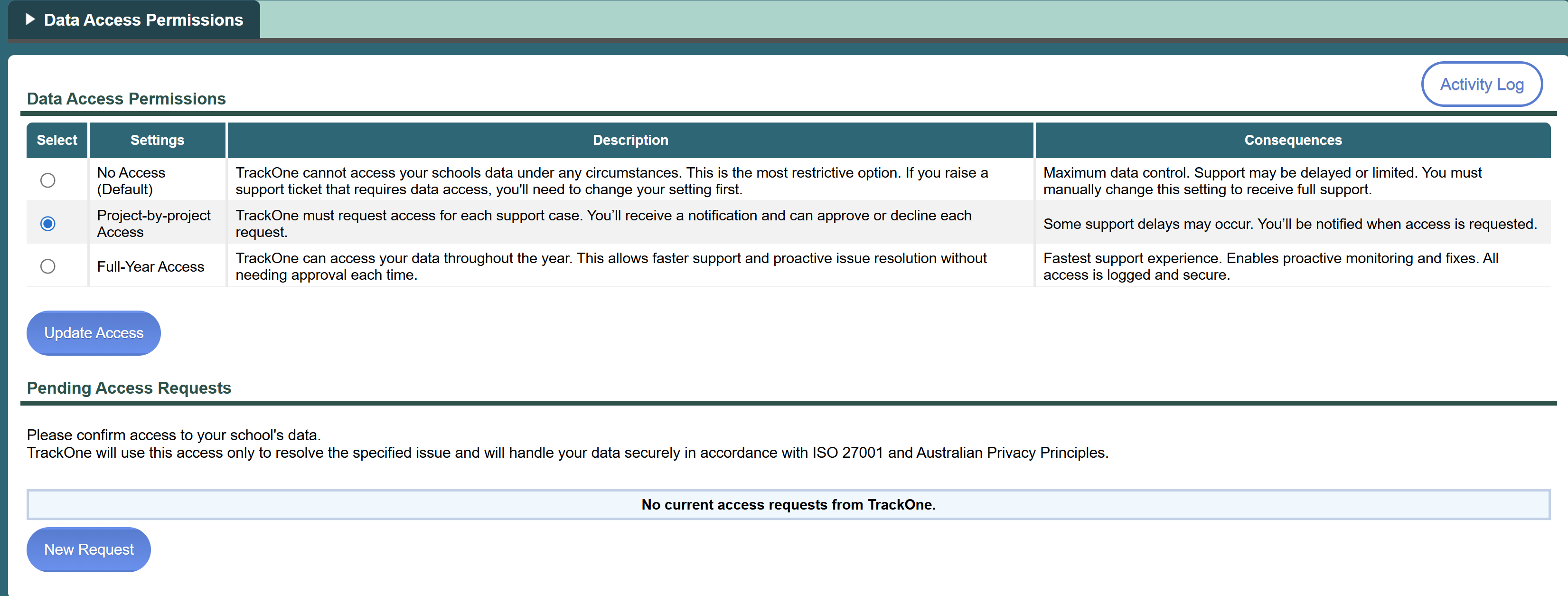
You have three choices:
| No Access | This is the default option and means that TrackOne does not have permission to take your database for any reason. This may make certain actions impossible such as new projects or updates. |
| Project-by-project Access | This means that you will give permission on a case-by-case basis and TrackOne will request that access (see below) for your approval. This will cause delays in support or projects. |
Full-Year Access | Blanket permission to move data as necessary. This is the fastest experience. |
You can change your choice at any time, granting or revoking access at your discretion.
Access Requests |
If using the Project-by-project Access option, requests to access the data will be submitted via this page by a staff member at TrackOne.
You will receive an email notification that a pending access request is waiting for your approval.
You can then approve or decline the access request.

Activity Log |
All changes including permission changes, access requests and approvals are logged to the Activity Log which will record everything for prosperity.